Agent risk scoring

Every agent, scored like an identity

An agent with tenant-wide connector access and a stale credential is a standing risk. Sentinel scores each one so the dangerous agents can't hide behind the useful ones.

  • Reach & exposure - how many users and channels an agent can touch feeds its score.
  • Tool & data access - broad connector and Graph grants raise the risk, and are shown.
  • Credential hygiene - aging or over-scoped application credentials are flagged.
  • Reliability - error and failure rates factor into a single, defensible score.
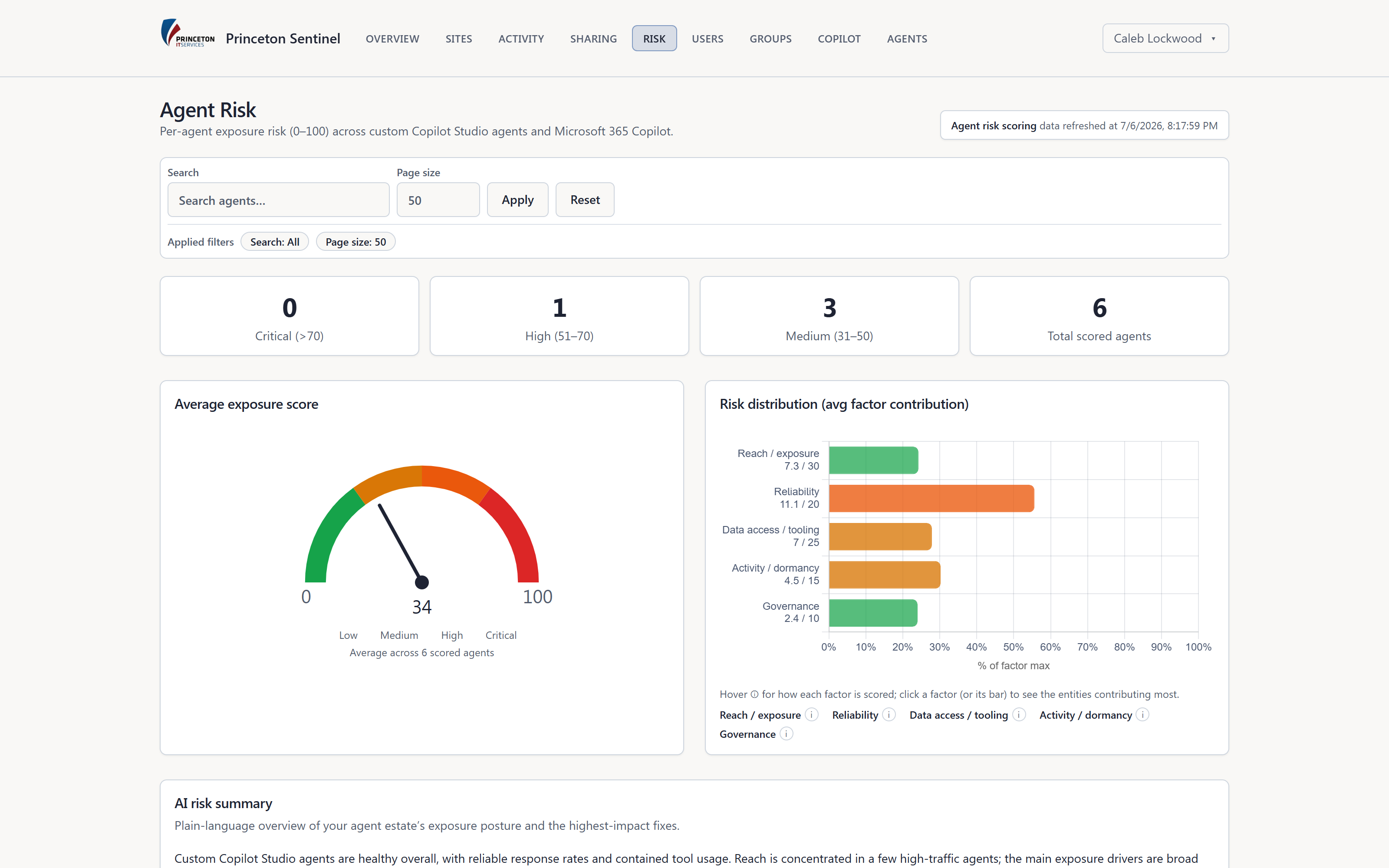
app.princetonsentinel.com/dashboard/agent-risk
Agent risk page with exposure gauge, risk levels, factor contribution, and AI summary
Telemetry

See what your agents are actually doing

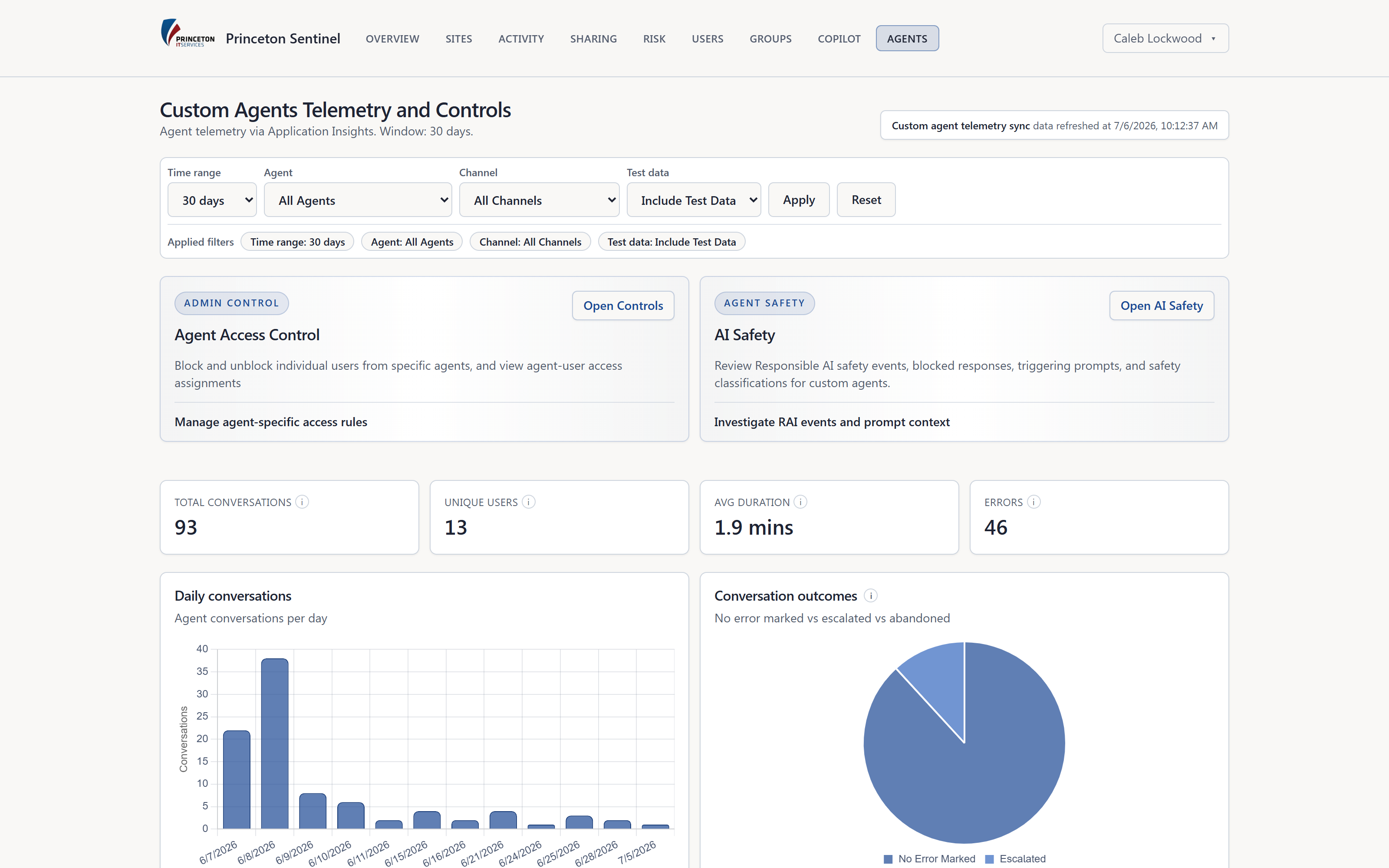
Governance without visibility is a policy document. Sentinel pulls live agent telemetry so you can see usage, topics, tools, and failures - and spot the agent that's suddenly everywhere.

  • Usage & sessions - conversations, unique users, and duration, trended over time.
  • Topics & tools - what agents are being asked, and which tools they invoke.
  • Latency & errors - response times and error rates surface reliability problems early.
  • Filterable - slice by agent, channel, and time window to investigate.
app.princetonsentinel.com/dashboard/agents
Agent telemetry dashboard with conversation trend, KPIs, and access controls
AI safety

Responsible-AI incidents, classified

When an agent produces an unsafe or off-policy response, Sentinel records it as a safety incident and classifies it - so your team reviews structured evidence, not scattered anecdotes.

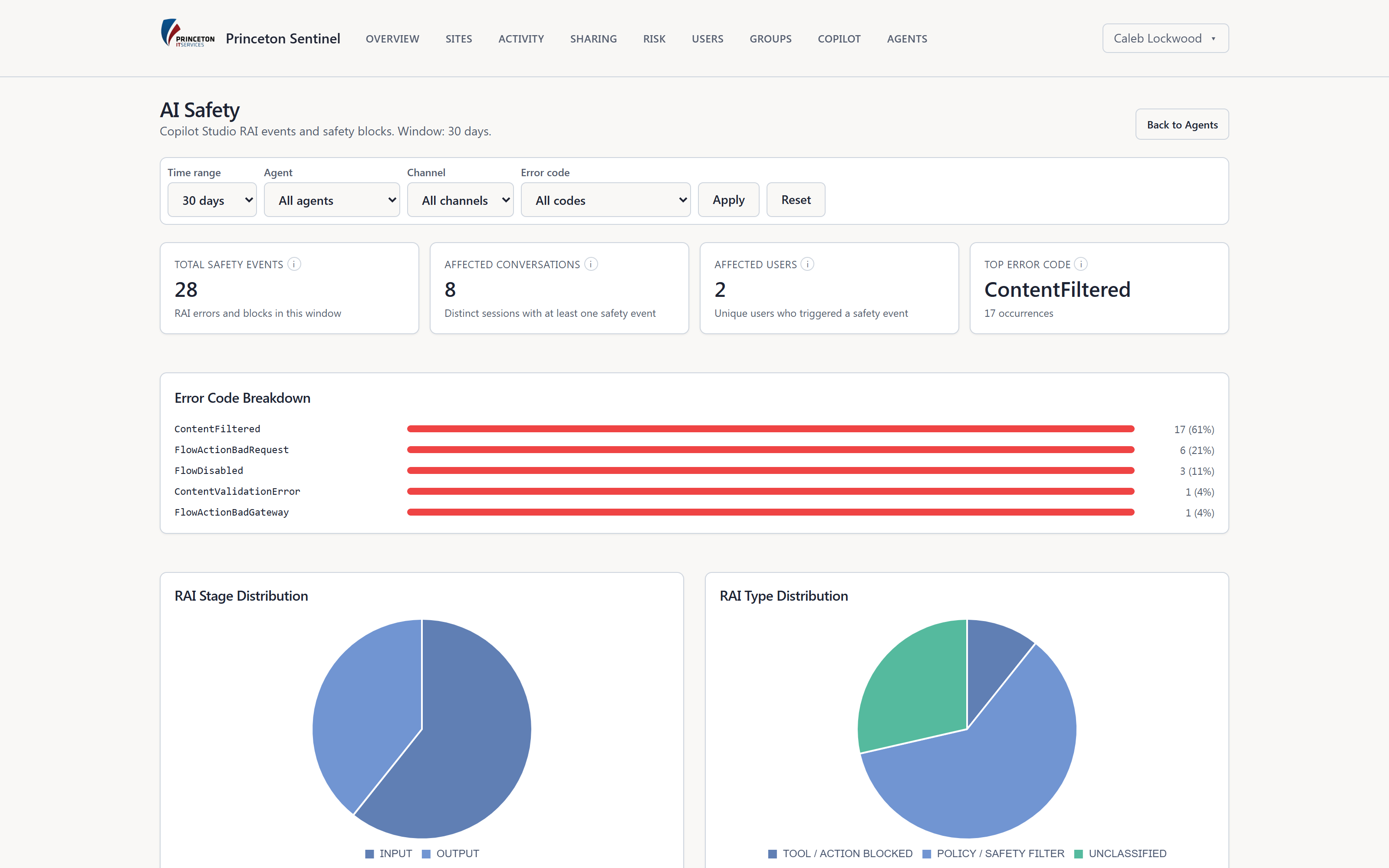
  • RAI event capture - blocked responses, content-filter hits, and policy violations, collected.
  • Stage & type classification - input vs output, and the kind of block, charted for triage.
  • Error-code breakdown - see which failure modes dominate, ranked by frequency.
  • Investigate a spike - filter to an agent, channel, or code and drill into the sessions.
app.princetonsentinel.com/dashboard/safety
AI safety page with responsible-AI event counts, error-code breakdown, and RAI distribution charts
Access control

Contain a risky agent in one click

When an agent crosses a line, you shouldn't have to file a ticket and wait. Sentinel gives admins direct, audited controls to block users or quarantine the agent entirely.

  • Block & unblock users - cut a specific user off from a specific agent, and reverse it.
  • Quarantine - take an agent out of service pending review, from the console.
  • Admin-gated & logged - every action needs an admin and lands in the audit trail.
app.princetonsentinel.com/dashboard/agent-risk
Agent risk detail used to review and act on a high-risk agent
Which agents does Sentinel cover?

Custom Copilot Studio agents across your tenant, plus Microsoft 365 Copilot. Each agent is inventoried and scored, and its sessions, tools, topics, and errors are pulled into the same console as your data-risk posture.

What drives an agent's risk score?

Reach (how many people and channels it touches), tool and connector access, credential hygiene (for example an aging application secret), and reliability. As with data risk, the numeric score is deterministic and the factor breakdown is shown.

What can Sentinel actually do about a risky agent?

Admins can block or unblock specific users from an agent, and quarantine an agent outright. Every action is gated by an admin role and written to an audit log - Sentinel surfaces risk and executes approved controls, it doesn't act on its own.

How does safety-incident tracking work?

Sentinel collects responsible-AI events - blocked responses, content-filter hits, and policy violations - and classifies them so you review evidence, not anecdotes. You can filter by agent, channel, and error code to investigate a spike.

Bring your riskiest agent to the demo

We'll score it live, walk its telemetry and safety events, and show the exact quarantine path - all inside a tenant that looks like yours.

Request a demo