Exposure scoring

A defensible score for every site

No more guessing which sites are risky. Each one gets a 0-100 exposure score from five weighted factors - with the breakdown shown, so you can defend the number to auditors and site owners alike.

  • Exposure - anonymous 'Anyone' links and organization-wide links are the dominant driver, and they're caught.
  • External reach - guests and outside recipients, and how many domains they come from.
  • Blast radius & dormancy - big stores, broad group grants, and idle sites that are still shared all score higher.
  • Link hygiene - links that never expire add risk; download-blocked links reduce it.
app.princetonsentinel.com/dashboard/data-risk
Data Risk page with risk-level counts, exposure gauge, factor distribution, and an AI risk summary
Site risk detail

The 'so what' and the 'now what'

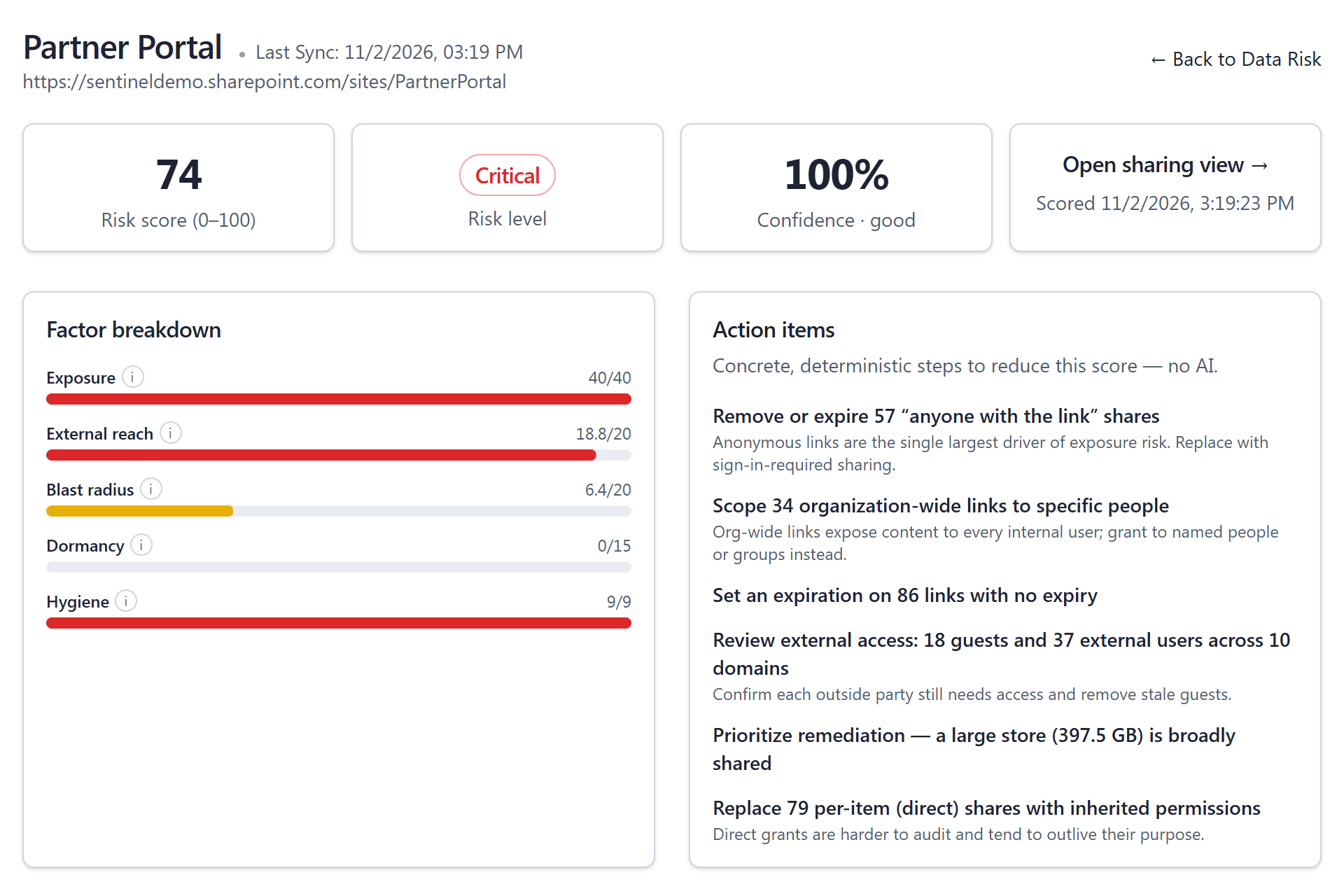
Open any site to see why it scored the way it did, and exactly what would bring the number down - concrete action items computed from the data, with an optional AI summary a CISO can forward.

  • Factor breakdown - each factor's points against its cap, so the driver is obvious.
  • Deterministic action items - 'remove 59 anonymous links', 'set expiry on 79 links' - computed, not generated.
  • AI summary on request - a plain-language explanation and recommendations, written inside your own Azure environment.
  • Confidence shown - scan coverage is reported next to every score, so a gap is never mistaken for safety.
app.princetonsentinel.com/dashboard/data-risk/site/partner-portal
Site risk detail with score, risk level, confidence, factor breakdown, action items, and AI summary
Remediation

From a finding to a fix

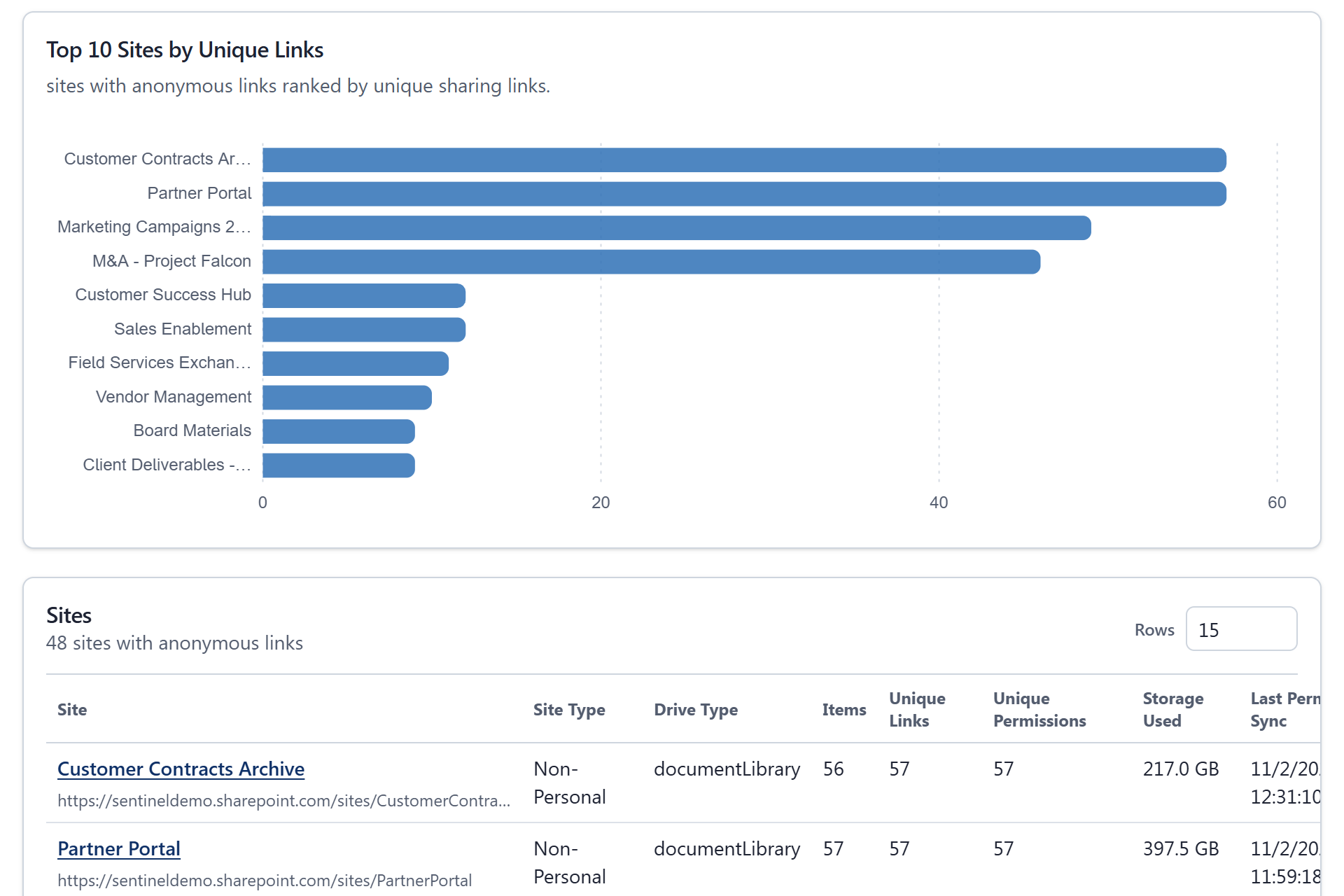
Insight that you can't act on is just anxiety. Sentinel puts the fix next to the finding - whether that is one link, every anonymous link on a site, or every non-owner permission on a set of files.

  • Revoke specific links - remove just the anonymous or organization-wide links from the link pages, leaving other access alone.
  • Bulk revoke - select files on a site and remove every non-owner permission in one run; owners always keep access.
  • Inheritance-aware - access inherited from a parent folder points you to the folder, so the fix sticks.
  • Admin-initiated - state-changing actions require an admin - nothing happens automatically.
app.princetonsentinel.com/dashboard/sharepoint-overview/anonymous-links
Anonymous Links page ranking sites by unique anonymous links, used to find and revoke public links
Audit

Every revoke, on the record

When an auditor asks what was done about the anonymous links, the answer is a log, not a recollection.

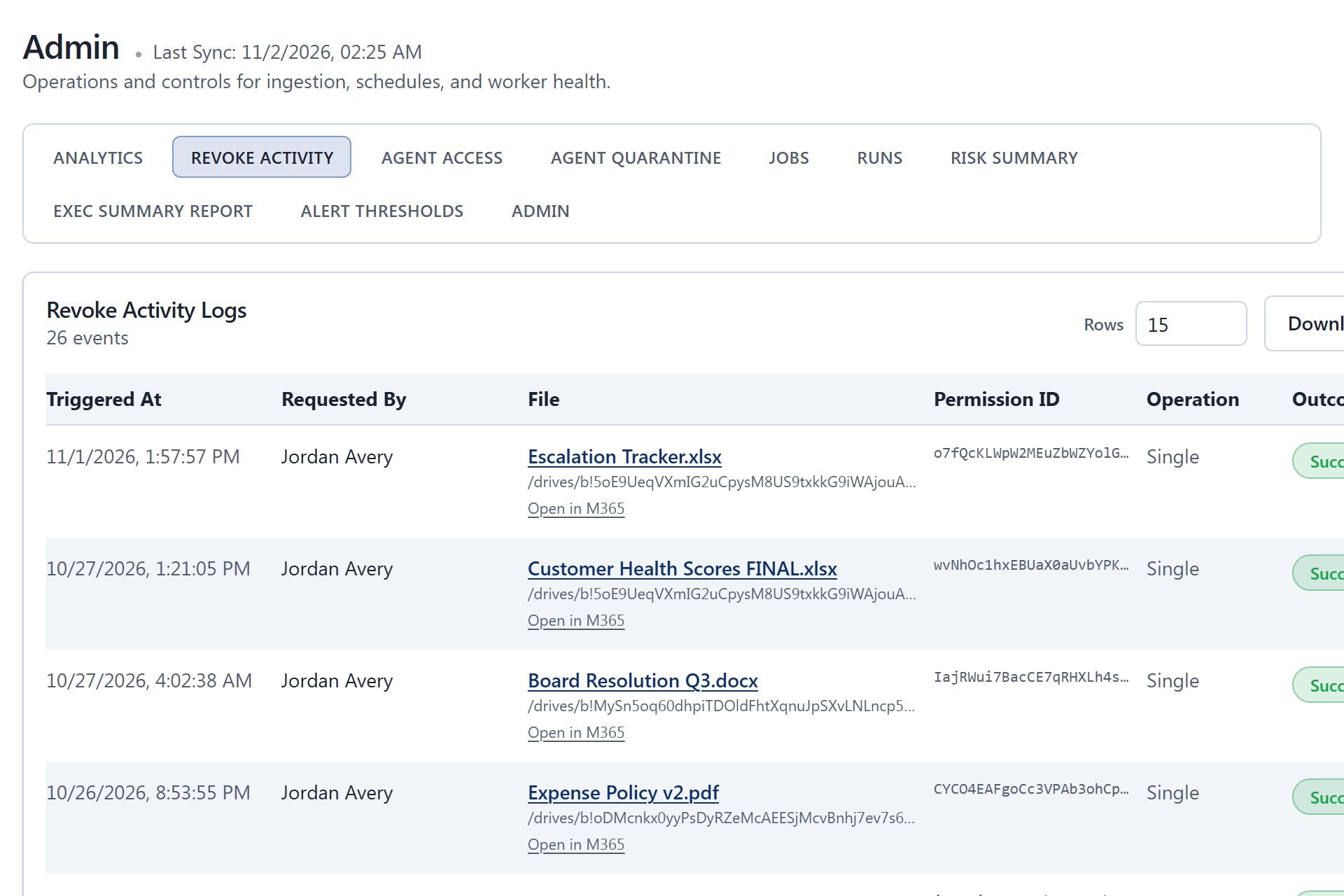
  • Revoke Activity log - every single and bulk revoke with requester, file, permission, outcome, and reason.
  • Failures explained - a revoke that could not complete says why, so nothing is silently skipped.
  • Export - download the log as CSV for your audit file.
app.princetonsentinel.com/admin/revoke-activity
Revoke Activity log listing revoked permissions with requester, file, outcome, and timestamps
The workflow

From findings to fixes

Detection is only useful if it ends in a remediated, audited environment.

01

Detect

Every site and OneDrive is scored from real sharing and access signals - no sampling, no manual review.

02

Prioritize

Risk levels, factor breakdowns, and action items push the highest-exposure sites to the top of the queue.

03

Remediate

Revoke specific links or bulk-remove non-owner access straight from the finding - always admin-initiated.

04

Audit

Every revoke is logged with actor, target, outcome, and time, and the site is re-scored on the next run.

FAQ

Data risk and oversharing questions

Why does Microsoft 365 oversharing matter for Copilot?

Microsoft 365 Copilot and Copilot Studio agents answer with content the signed-in user can already open. A file shared through an 'Anyone' link, an organization-wide link, or a forgotten guest grant can surface in a Copilot answer to people who were never meant to see it. Scoring every SharePoint site and OneDrive for that exposure, and revoking the riskiest links first, is how you get the data ready for Copilot.

What signals go into a site's exposure score?

Five weighted factors: Exposure (anonymous and organization-wide links, up to 40 points), External reach (guests and outside recipients across domains, up to 20), Blast radius (storage held and the groups granted access, including role-assignable and dynamic groups, up to 20), Dormancy (sharing left on sites nobody is using, up to 15), and Hygiene (links with no expiry or direct grants add points; download-blocked links take them away, -3 to +9). The factor breakdown is always shown, so the number is never a black box.

What do the risk levels mean?

Critical is above 70, High is 51-70, Medium is 31-50, and Low is 0-30. A site whose permission scan is incomplete is marked Insufficient data rather than Low, because an unread file can hold links the score has not seen.

Does scoring or remediation change anything without approval?

No. Scoring is entirely read-only. Revoking a link or running a bulk revoke is an explicit, admin-initiated action - Sentinel never removes access on its own. Bulk revoke always leaves owners their access, and every action is written to the Revoke Activity log.

How fresh are the scores?

Scores are recalculated on a schedule you control, against the inventory the sync has pulled from Microsoft Graph; the sync reads only what changed since the last run. After you remediate, the affected sites are re-scored on the next run so the queue reflects reality.

What are the AI summaries, and where does that run?

On top of the deterministic score, an optional Azure OpenAI deployment in your own subscription writes a plain-language summary of the tenant and, on request, of a single site. Summaries are stored and reused until the score behind them changes. The score and the action items never depend on AI, and you can deploy without Azure OpenAI at all.

Find your riskiest sites this week

In the demo we'll score a tenant that looks like yours and walk the exact path from a high-risk finding to a logged, remediated fix.

Request a demo